v1.1 — Multi-Timeframe Strategies + Donchian Channels
Released 2026-05-04
This release introduces multi-timeframe support, allowing each strategy condition to evaluate on its own timeframe independent of the strategy's base candle interval. It also adds Donchian channels to the indicator library. Existing single-timeframe strategies are unaffected and continue to produce byte-identical results.
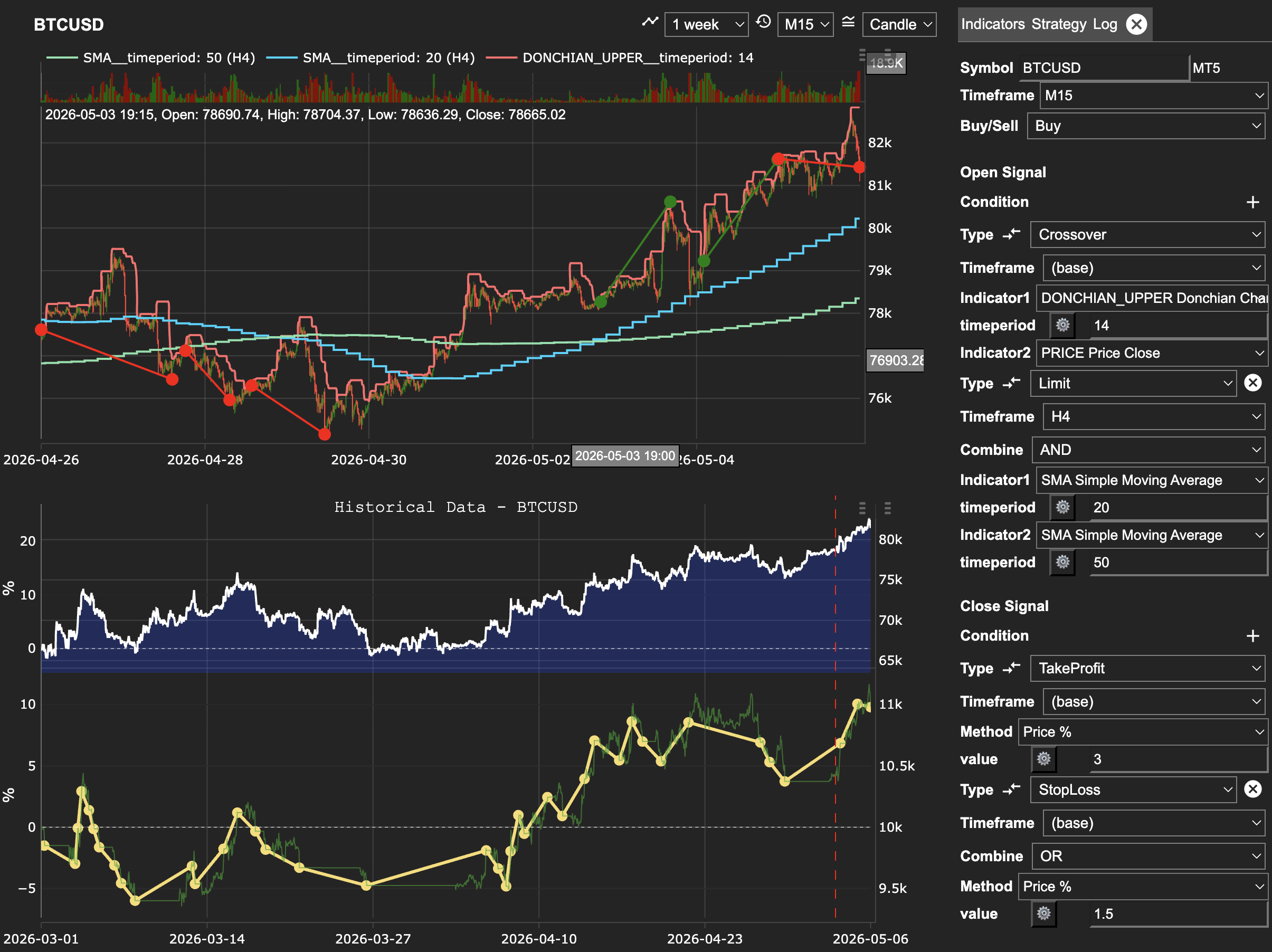
Example: BTCUSD on an M15 base, Donchian breakout entry on the base timeframe, EMA trend filter evaluated on H4. Both v1.1 capabilities — multi-timeframe conditions and Donchian channels — composed in a single no-code strategy.
Multi-timeframe conditions
Every Crossover and Limit condition — both open and close — now has a Timeframe dropdown. Choose any supported timeframe and the condition is evaluated on that timeframe, then projected onto the strategy's base bar boundary.
The default (base) keeps the condition on the strategy's primary
timeframe, so nothing changes for existing strategies.
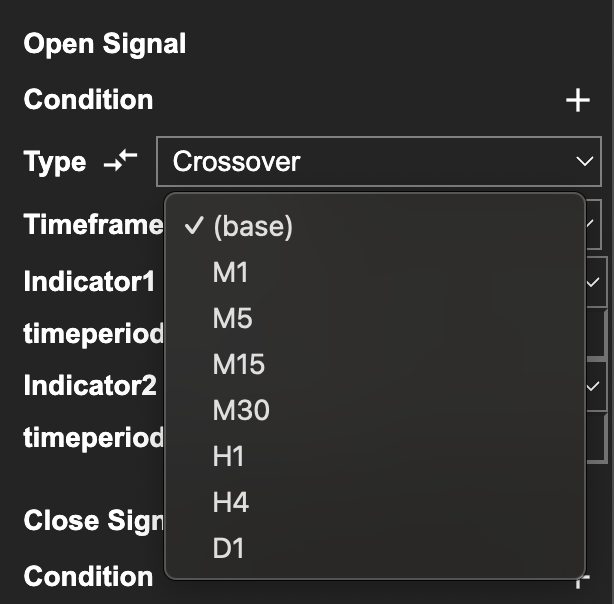
How to access it
Open the Strategy Builder at app.strateda.com
and add or edit a Crossover or Limit condition. The new Timeframe
field sits alongside the indicator selectors. Set it to (base) to keep
the existing behaviour, or pick any supported timeframe to evaluate the
condition independently of the strategy's base interval.
What this enables
- HTF entry filter — an M1-base strategy that takes entries on an M5 EMA crossover and uses an M1 stop-loss and close. Trades execute every minute, but entries are gated by the slower M5 trend.
- LTF precision entries — an M5-base strategy that triggers on a faster M1 crossover for more precise entry timing within the M5 bar.
- Mixed timeframes in a single strategy — stack a slow trend filter on H1, an intermediate signal on M15, and a fast trigger on M1, all in one strategy.
Multi-timeframe with stop-loss and take-profit
Stop-loss and take-profit conditions evaluate on the base timeframe. Combining them with multi-timeframe entry signals is fully supported — for example, an M5-base strategy with an M1 entry crossover and a 0.05% stop-loss runs end-to-end against both the backtest and live engines.
For details on how Crossover and Limit conditions work, see Open Signal Conditions and Close Signal Conditions.
New indicator: Donchian channels
Donchian channels are now available as three indicator slots in Crossover and Limit conditions:
DONCHIAN_UPPER— highest high over the lookback periodDONCHIAN_LOWER— lowest low over the lookback periodDONCHIAN_MIDDLE— midpoint of upper and lower
Each slot takes a single timeperiod parameter. Donchian slots can be
used wherever any other indicator can — including with the new
multi-timeframe support, so a Donchian breakout on H1 can drive an M5
strategy.
For the full indicator catalogue, see the Indicator Library.
Compatibility
- Existing single-timeframe strategies produce byte-identical results. The multi-timeframe code paths only engage when at least one condition has a non-base timeframe.
- No strategy configuration changes are required. Existing strategies keep running unchanged.
- All new conditions default to
(base)timeframe.
Known limitations
- HTF stop-loss and take-profit conditions are not yet supported. Stops always evaluate on the base timeframe.